A Complete Guide to Using Our Community
Joining an online community should feel welcoming, not overwhelming.
Whether you're brand new or you've been a member for a while, learning a few simple features can make your experience much more enjoyable. Instead of worrying about missing important announcements or wondering where to ask questions, you can spend your time connecting, learning, and creating.
This guide will help you navigate our community with confidence.
Check Your Email
You will receive 3 important emails from us, so please be sure to check for emails from hello@naturallymelissamade.com
Message 1 Subject: Important: Your access to training
Message 2 Subject: Melissa Steiner has invited you to join the "The Hook Nook Crochet" community
Message 3 Subject: A Complete Guide to Using Our Community
Message 2 will ask you to confirm your subscription. Click the link inside that message, set up your profile and you'll be good to go. Please set your display name to the name you'd like the community to call you.
If you don't see that email (check your spam, promotions and trash folders to be sure!), reach out to me hello@naturallymelissamade.com and I'll get it sorted right away.
To avoid missing anything I send to you, it's best to add me to your contacts too.
I look forward to seeing you in the community!
Changing Your Display Name
It is very important to me that all members are able to be referred to by there name rather than their log in name. If you missed the step that allows you to set up your display name (don't worry, I did too), please follow these steps.
Step 1:
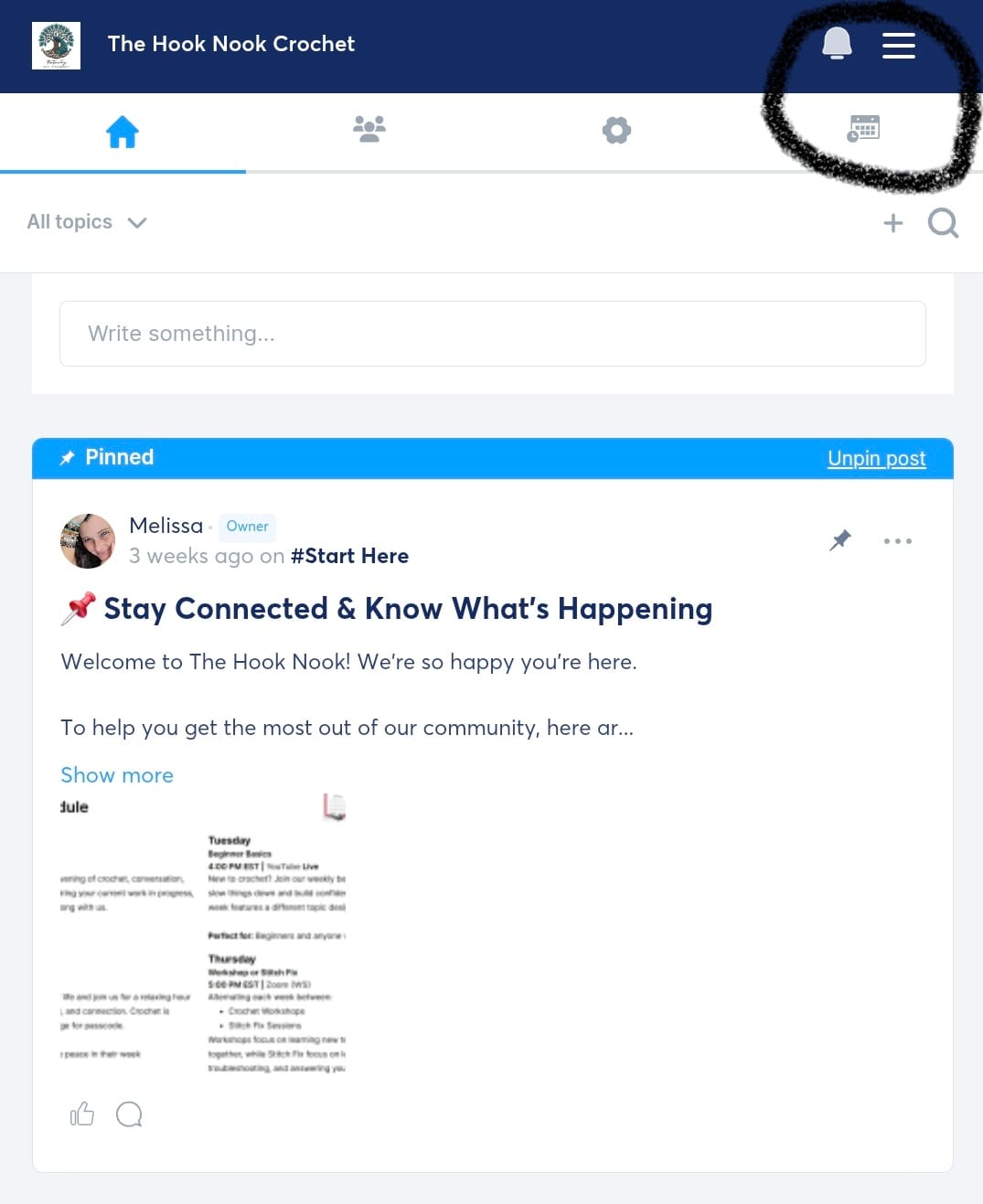
From Home Screen within community, click on 3 lines in upper right corner.
On PC you will click arrow under your profile picture.
Step 2:
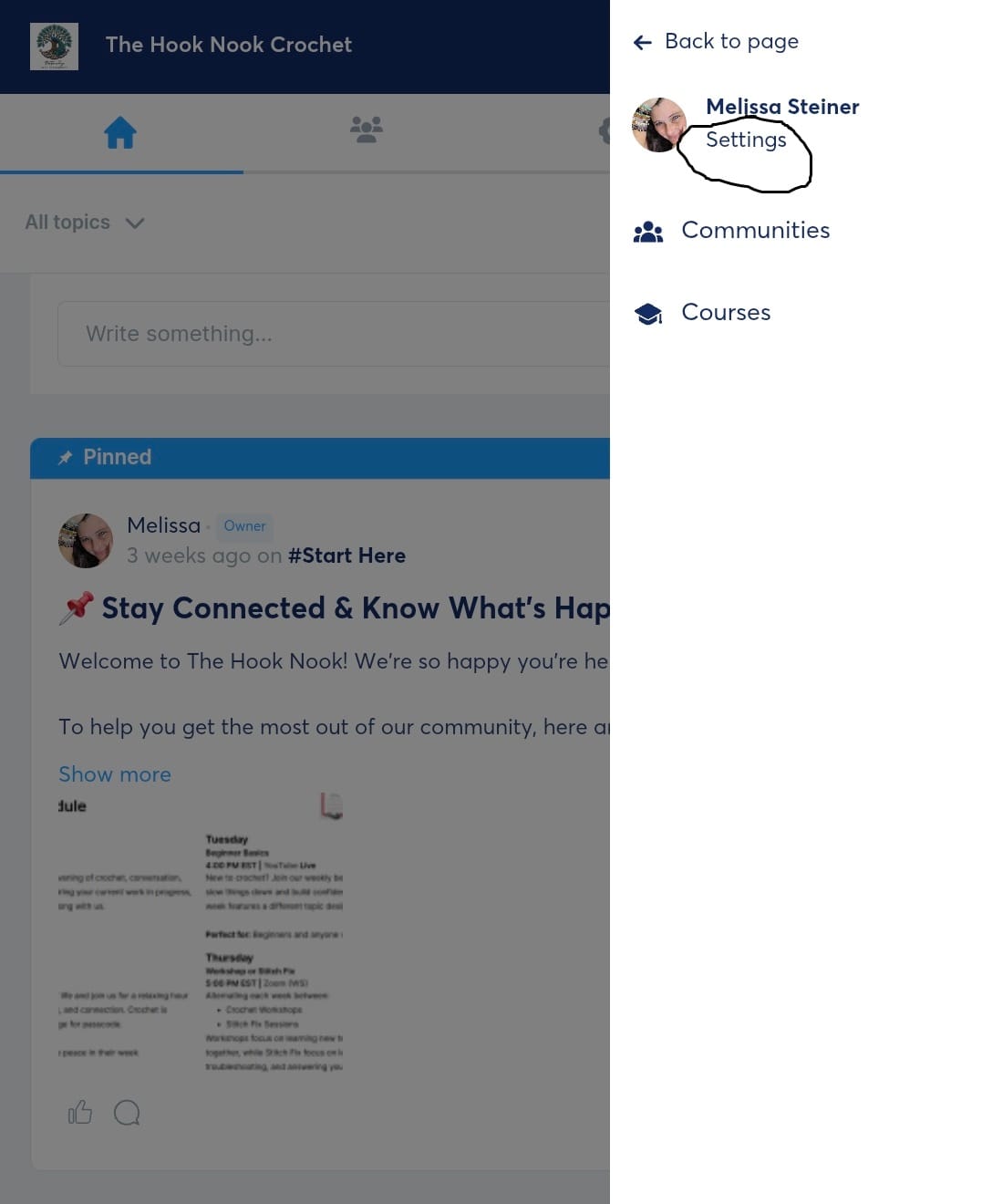
Click on Settings Option found under your profile picture.
On PC will look a little different but located in same place.
Step 3:
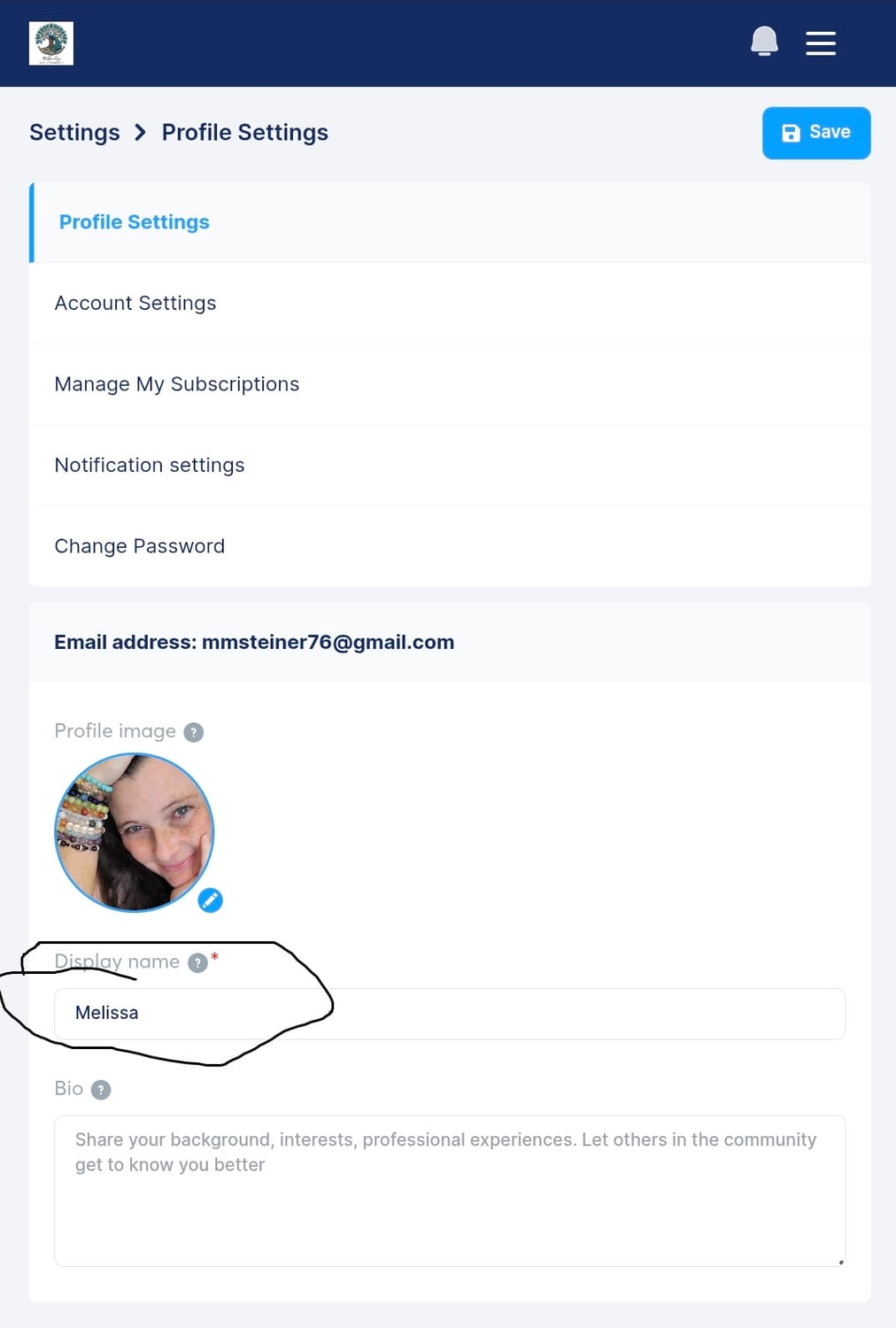
Locate display name. Type in your chosen name and done!
Here you can also add a photo.
Stay in the Loop with Notifications
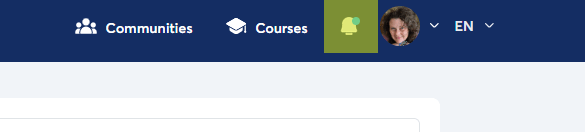
One of the easiest ways to make sure you never miss a class announcement, challenge, or important update is by enabling notifications.
We will post regularly, but your notification settings determine what actually reaches you.
I recommend:
Turn on email notifications for important announcements.
Enable browser or mobile notifications if you visit often.
Check your notification settings every few months to make sure nothing has changed after app or browser updates.
If you ever feel like the community has become quiet, there's a good chance your notifications simply aren't reaching you.
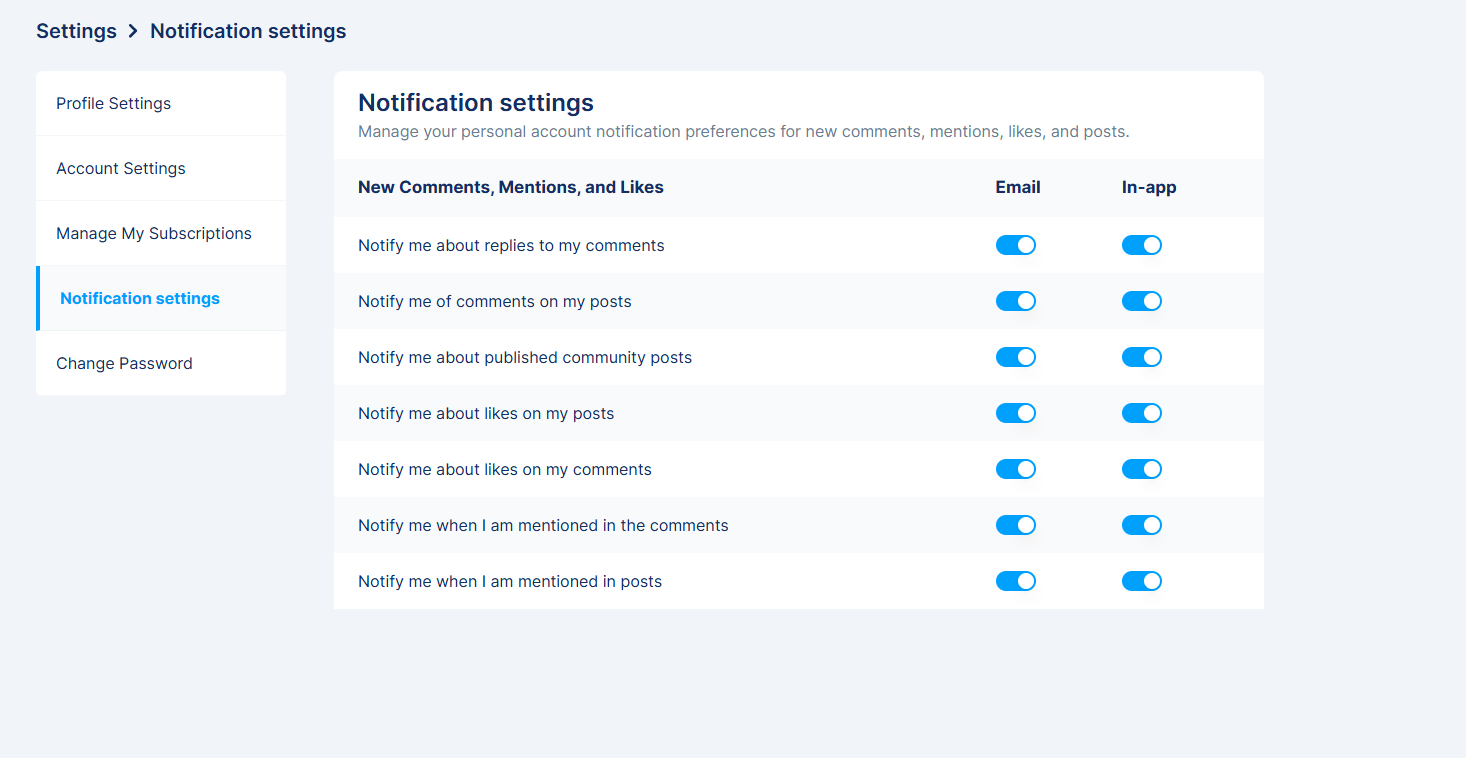
Managing Your Notification Settings
Your notification preferences are completely customizable.
From your community account:
Click your profile picture.
Open Settings.
Select Notifications.
Choose how often you'd like to be notified.
Save your changes.
Everyone uses communities differently.
Some members enjoy receiving every update, while others only want notifications when someone replies to their own posts. Choose the option that fits your lifestyle.
Save the Community to Your Home Screen
Hook Nook Log In Page can be found here.
One of my favorite tips is treating the community like an app—even though you don't have to install one.
Saving it to your home screen makes it just one tap away.
Android
Open the community in Chrome.
Tap the three-dot menu.
Select Add to Home Screen**.**
Confirm.
An icon will appear alongside your other apps.
iPhone & iPad
Open the community in Safari.
Tap the Share button.
Scroll down.
Choose Add to Home Screen.
Tap Add.
Now you can launch the community just like any other app.
Windows or Mac Desktop
If you're using Chrome or Microsoft Edge:
Open the community website.
Look for the install or app icon near the address bar (if available), or open the browser menu.
Choose Install App or Install This Site as an App.
Confirm.
You can also simply bookmark the page and pin that bookmark to your bookmarks bar for quick access.
Understanding Community Topics
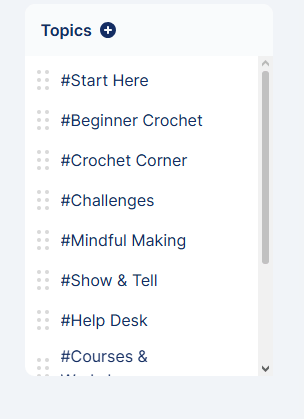
Think of topics like rooms in a large house.
Each room has its own purpose.
Instead of every conversation happening in one long feed, topics help organize discussions so members can quickly find exactly what they're looking for.
For example, our community includes topics for:
Start Here
Beginner Crochet
Classes & Workshops
Community Hub
Crochet Corner
Challenges
Show & Tell
Help Desk
Member Spotlights
Comfort Companions
Posting in the appropriate topic helps everyone find your content later. Each topic has a pinned post to help guide you on it's purpose and what you might find there.
How to Create a Post
Creating a post is simple.
Open the topic that best matches your post.
Click Create Post or the posting area.
Add your title if prompted.
Write your message.
Upload photos or videos if you'd like.
Publish your post.
Choosing the correct topic keeps the community organized and helps your post reach the members most interested in that subject.
Browsing by Topic
Instead of scrolling endlessly through every post, use topics to explore what interests you.
You can:
Visit Beginner Crochet for learning resources.
Browse Show & Tell to admire finished projects.
Check Community Hub for weekly posts.
Open Challenges to join current challenges.
Visit Comfort Companions to follow new character releases.
Browsing by topic makes it much easier to find older posts again later.
How to Interact with Other Members
Communities thrive when members participate.
Here are a few easy ways to engage:
Like posts that inspire you.
Leave encouraging comments.
Answer questions when you know the answer.
Share your progress—even unfinished projects.
Celebrate the accomplishments of others.
Remember, no project has to be perfect before sharing it. Some of the best conversations begin with, "I'm still learning."
Tips for the Best Experience
A few small habits can make your time in the community even more enjoyable:
Visit a few times each week.
Keep notifications enabled.
Introduce yourself if you're new.
Go to your profile and change your name (instead of user name)
Don't be afraid to ask questions.
Share your wins, no matter how small.
Encourage fellow members whenever you can.
Communities become stronger because of the people who participate—not just the people who teach.
Stay Connected & Know What's Happening
To help you get the most out of our community, here are two important resources you'll want to keep handy.
Never miss a live, workshop, challenge, or special event!
You can always find our most up to date schedule here:
I recommend bookmarking the page so it's always just a click away. Utilizing this link gives you access to the event links as well.
Need Help?
If you have questions about the community, courses, workshops, your account, or anything else, I'm always happy to help.
Simply send me an email at:
hello@naturallymelissamade.com
I do my best to respond as quickly as possible and want every member to feel supported throughout their crochet journey.
Welcome Home
Whether you've joined to learn a new skill, make friends, find encouragement, or simply enjoy a peaceful place to create, we're glad you're here.
If you haven't joined yet, please feel free to do so!
Take a look around, explore the topics that interest you, and don't hesitate to join the conversation.
We can't wait to see what you create.
HEY, I’M MELISSA…
Hi, I'm Melissa—the creator behind Naturally, MelissaMade, founder of The Hook Nook, and dreamer of the Purple Peacock Bus.
As a homeschooling mom, homesteader, crochet educator, and handmade artisan, I've discovered the incredible power creativity has to bring peace, confidence, and connection.
What began as a simple hobby became my sanctuary, inspiring a business and community dedicated to helping others experience the therapeutic benefits of crochet one stitch at a time.



JOIN MY MAILING LIST
The Hook Nook Chronicles shares crochet tips, inspiration, community stories and creative growth.
912-655-3428
Newsletter
Subscribe now to get daily updates.